Is your company, using QuickBooks Pro
or Premier Plus with Enhanced Payroll and renewing your accounting software
prior to September 30, 2026?
Save by switching to a QuickBooks Enterprise Gold subscription with 20% off
your first year and DIY payroll for unlimited employees and lower per EE fees than
regular Enhanced Payroll for 3 EINs to save instead of buying each product
separately and you can get a no monthly fee merchant account with lower CC and
ACH transaction fees.
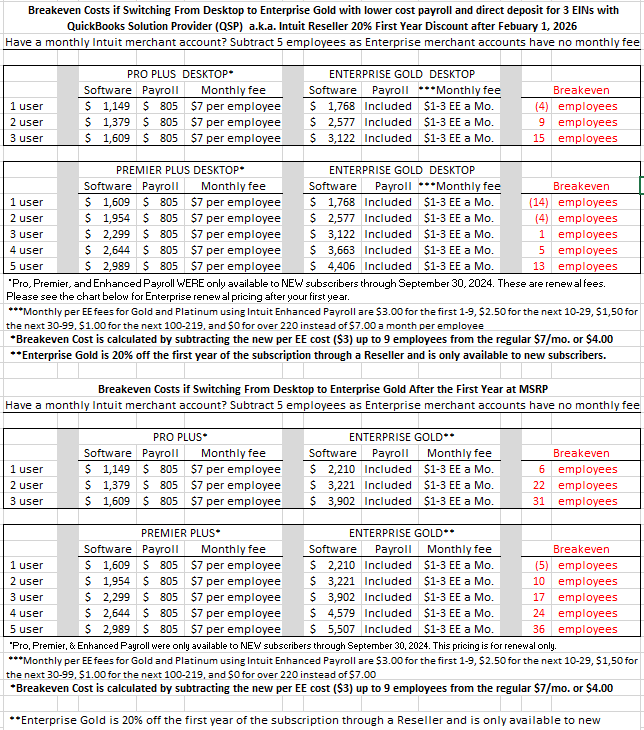
Please look at the chart below to
see your breakeven point is by the number of employees.
See below for your savings by buying
through an authorized Intuit Reseller or QuickBooks Solution Provider.
The first-year price plus
applicable taxes is listed in the first section.
You can also buy a monthly subscription
but it is more annualized so ask your credit card company if they offer a buy
now, pay later payments plan.
Enterprise prices expire January 31, 2027
and desktop Pro and Premier will increase October 1, 2026
QuickBooks
Desktop Enterprise Gold (Premier on steroids) with Intuit’s
60-day money back guarantee comes with currently no limit to the
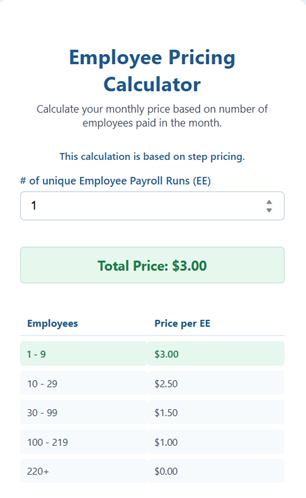
number of files, DIY Intuit Enhanced Payroll and lower per EE payroll fees (see
chart) with direct deposit for up to three EINs, and comes with my QuickBooks
Solution Provider (QSP) or Intuit Reseller 20% off Intuit’s price for the first
year.
After your first year, you would pay the amount for your Enterprise
subscription in the second chart. Intuit reserves the right to increase prices
although they usually have averaged 5% on past renewals.
If you are on an annual Pro Plus, Premier Plus, or Enhanced Payroll subscription,
you will get a refund or credit towards your new improved program.
Here's a summary of some improvements over using Pro or Premier:
·
The Home Page and 95% of the
drop-down menus and choices are the same as Pro or Premier or Accountant.
You probably won’t be able to tell the difference.
·
Enterprise doesn’t have the file
size or number of names restrictions of Pro (100MB/10,000 customers) or
Premier (150MB/14,500 total names) and if works faster as it is a database
driven program.
·
Enterprise unlike Pro or Premier
Plus provides $3,000 worth of training and US based support including
Priority Routing through your Full-Service Plan.
·
Unlike Pro or Premier, you get
access to Open DataBase Connectivity
or ODBC which can be used to import or export data using Excel.
·
You still get onsite backup
for 100 GB for one computer but I recommend backing up your file in single user
mode within the program once a week as it verifies data.
·
Unlike Pro and Premier, you get a
one user license valued at $420 a year of Field Service Management Software for dispatching and scheduling.
·
Unlike Pro and Premier, you get the
ability to create custom reports and Advanced Reporting.
·
Unlike Pro and Premier, you get the
ability to create custom user permissions:
Assign Access to 115 specific areas of the program
Restrict Access to View only, Create, or Modify including specific
financial accounts.
Create roles and assign them to user (you can assign multiple roles)
·
Unlike Pro and Premier, you get 8
more custom fields (15 instead of 7) to use with your customers, vendors,
employees, and items and the ability to specify custom roles and specific
granular permissions.
·
Unlike Pro and Premier, you can batch
enter (invoices, credit memos, sales receipts, bills and bill credits, credit
card charges and credits, expenses, checks, or deposits) and delete or void
(invoices, bills, checks, or sales orders) transactions.
·
Unlike Pro and Premier, you can open
up two company files at the same time, manage your fixed assets and
depreciation, and attach pictures to inventory or your items.
·
Unlike Pro and Premier, you get have
access to accountant tools such as manage fixed assets and depreciation, fix
incorrectly applied sales tax, vendor and customer payments, troubleshoot
inventory, write off invoices, merge vendors, and reclassify transactions
·
Unlike Pro and Premier, you get multi
company reporting so if you have multiple companies, you can see all that
information in one report for up to four companies.
·
If you are
currently on Premier, you can still choose
Contractor, Manufacturing and Wholesaling, Professional Services, Retail,
Nonprofit, or General Business modules.
·
If you are
currently on Pro, you can upgrade to
Contractor, Manufacturing and Wholesaling, Professional Services, Retail,
Nonprofit, or General Business modules, additional features, and related
reports.
·
If you have Pro, you will like being
able to see all of your reconciliations instead of only the last one,
use multiple units of measurements, create Sales Orders, Inventory
Assemblies, and have custom billing rates for your employees and vendors.
·
You have an optional e-commerce
integration using Webgility for sales channels.
·
If you use QuickBooks Payments,
the monthly fee or minimum is waived and the transaction fees are lower:
1.5% swiped, 2.9% keyed plus .25 cents (volume discounts available) and ACH
payments up to $99,999 with history for $1% with a cap of $10.00, a better deal
if you are currently paying 1% with no cap or a lower cap.
·
I also provide an extensive
welcome package of training material and information about your new product
and using payroll that you don’t get with Pro or Premier Plus subscriptions and
Intuit Direct doesn’t send. And I service what I recommend, sell, or offer.
To speed up your order or to inquire
further, send an e-mail to info@drqckbks.com I will need the
legal name of the company and any DBAs, contact name, address, city, state,
zip, business phone and any extensions, cell phones, e-mail that you use for
your existing Intuit account, what your business does, what you are currently
using for accounting, payroll, and merchant services, and website.
Once I have entered your information, I will contact you for the payment
information, your license and product codes for your existing Intuit desktop and/or
payroll subscriptions, and FEIN as it is required for payroll.
Intuit requires
me to disclose the following:
MONTHLY OR ANNUAL TERMS OF SERVICE
• At
the present time, there are no additional fees for additional companies like
QuickBooks Online. However, Intuit reserves the right to implement them.
• Enrollment for an annual subscription with
my first-year discount for QuickBooks Enterprise
commits you to a 12-month term. You will also be making the same
commitment for your hosting with Rightworks formerly Right Networks if you choose that option.
• You can elect to pay your annual subscription in equal payments with my first-year
discount on monthly over the course of 12 months.
• You must pay for all 12 months of the subscription in full based on the
then-current rate of QuickBooks Enterprise with my discount.
• If you choose to cancel inside the first 60 days, you can opt to receive a
refund per the 60-day money-back guarantee (which you can access via: “my
account link”).
• However, if you choose to cancel after the first 60 days and prior to the end
of month 12, you will be subject to a termination fee equal to the total amount
of monthly payments left on your annual subscription.
• For purpose of clarity, if you cancel after 6 months and have 6 months
remaining on your annual subscription, which starts at the date of enrollment,
you will be charged a termination fee equal to your monthly fee of QuickBooks
Enterprise multiplied by 6 months (remaining months left on an annual
subscription).
• Terms, conditions, pricing,
features, service and support options subject to change without notice.
* After year one, your credit card account will be automatically charged the
then-current price of the QuickBooks Enterprise subscription every year (or
month) unless and until you cancel.
Cancel at any time by calling 800-300-8179,
prior to your renewal date. If you cancel outside of the 60 days satisfaction
period you will have access to Enterprise for the remainder of the year in
which you paid an annual subscription. The following year you will no longer
have access to the product or any of its connected services. We will authorize
your card to ensure prompt order processing, resulting in a temporary hold on
your account.
If you choose to not renew your Enterprise Solutions subscription, here are
your other options to access the data in your company file:
• You can start an Enterprise Solutions free trial subscription to read your
data, and then cancel your free trial before it ends. I can provide you a link
to do that.
• You can take your company file to another accounting software provider, who
can migrate your file to their software.
However, you may be able to convert it to Pro or Premier and use it but that is an additional cost
for the subscription and conversion.
• You can take your file to an Intuit Reseller or QuickBooks ProAdvisor and
have them access the data for you. Some of us
have special Enterprise Accountant licenses.
Dr. Quick Books, Inc.
2304 NE 89th St. Seattle, WA 98115 info@drqckbks.com 206-789-8328
PT